Boats now supports tapping or left-clicking on a number clue to grey it out. You can use this for any purpose you’d like, such as marking rows or columns that are “done.”
Mines has a new preference that allows marking squares with a “?”. When turned on, right-clicking a covered square will cycle between a flag, a question mark, and unmarking the square.
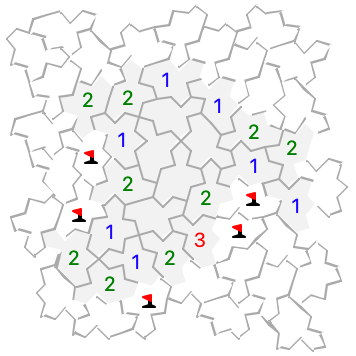
Mines has several new grid types: honeycomb, triangular, wrap-around grids, and some more unusual tilings.
When you’re playing the new grids, remember that the surrounding mine counts include every tile that touches even just at a corner. To help visualize this, the adjacent unmarked tiles are highlighted while you press on a clue tile (with a number). To also include tiles you’ve marked as having a mine, enable the new Mines preference “Highlight adjacent flags when clicking on a clue.”
On a touch screen with “Long press for right click” turned on, the highlights disappear
as soon a long press is detected. If you want to keep them visible longer, increase the
detection time in the
(Anders Höglund contributed the additional Mines tilings in the original portable puzzle collection.)
New Fill in marks and Hint options in the game menu work like the “M” and “H” keys, for puzzles that offer those features. (Undo will remove the marks if you change your mind.)
Rome now supports Fill in marks (“M” key) and Fill in hints (“H” key). Hints fills in all pencil marks except ones that couldn’t be possible (like arrows that point off the edge of the board or directly at the opposite arrow).