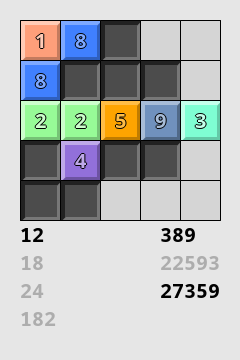
You’re given a grid with several black squares, and a list of numbers. Your objective is to fill every empty square with a digit, so each number appears once in the grid when reading from left-to-right or from top-to-bottom.
This is an implementation of Nansuke, which was invented by Nikoli. It’s sometimes known as Number Skeleton.
More information: https://www.nikoli.co.jp/en/puzzles/nansuke/
Crossing uses the same control scheme as Solo.
Left-click to select a cell, then type a number on your keyboard to enter it. Press Backspace or Space to clear a cell.
Right-click a cell, then type a number to add a pencil mark. Pencil marks can be used for any purpose.
You can also use the arrow keys to move the selected cell around. Press Enter to toggle between entering number and entering pencil marks.
These parameters are available from the ‘Custom…’ option on the ‘Type’ menu.
This puzzle has severe problems.
The largest problem is related to a limitation of the original Portable Puzzle Collection framework, which is that all puzzles of the same size must use the exact same window space. Since the number list varies between puzzles, there is no reliable way to always fit the list on screen.
The above problem has stopped me from addressing the other points I’m unhappy with: