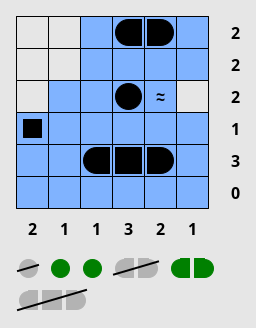
You’re given a grid, and a list of boats which must be located inside that grid. Boats can be rotated. Two boats cannot be horizontally, vertically or diagonally adjacent.
The numbers on the side indicate the amount of cells inside that row or column which are occupied by a boat.
Some boat segments are given (corner pieces, centers, or single-length boats), along with their orientation.
At the bottom of the puzzle is a list of every boat that must be placed in the grid. When a boat is found, it is automatically crossed off of this list. Make sure a boat is surrounded by water on all sides, to indicate that it cannot possibly grow any further.
This puzzle is best known as Battleships.
More information: https://www.janko.at/Raetsel/Battleships/index.htm
Left-click to place a boat segment in the grid. Unknown boat segments are represented by a small rectangle, and will automatically change into the correct shape when the surrounding cells are filled in.
Right-click to place water, to indicate that a boat cannot be placed here.
To play with a keyboard, use the arrow keys to move the cursor. Press Enter to place a boat segment, and press Space to place water. Or to quickly fill multiple squares, hold Ctrl or Shift along with the arrow keys to place boat segments or water, respectively.
Left-clicking a number will mark it as done (grey it out), or unmark it if it is already marked. On a keyboard, press the ‘X’ or ‘Y’ keys to mark the numbers for the cursor’s row or column.
These parameters are available from the ‘Custom…’ option on the ‘Type’ menu.
3,2,1 represents 3 boats of size 1, 2 boats of size 2, and 1 boat of size 3.This puzzle is playable. The solver cannot currently handle some of the harder Battleship puzzles out there.